

Remote assistance and technical support for water systems starts with secure access to compatible system controls. Set up authorized access, identify the operating data technicians need, and establish a process for remote diagnosis while keeping local safeguards in place. The right setup depends on the system’s controller, communications capability, and site requirements.
Remote access makes it easier to review operating conditions and guide troubleshooting without being beside the equipment. But a connection alone is not enough: useful support also relies on clear permissions, relevant system data, and a practical way to communicate findings to on-site staff. This guide explains how to prepare equipment and networks, configure access, and use the connection for technical support. It also covers where remote troubleshooting helps and when a problem still needs hands-on work.
Key Takeaways
- Match the remote connection method to the system’s controller and communications capabilities, then set access permissions before use.
- Prepare a clear support workflow with operating data, issue details, and a way to coordinate with on-site staff.
- Identify which system components can be monitored remotely and which tasks still require physical inspection or intervention.
- Use a consistent troubleshooting sequence to review symptoms, assess available readings, and decide on the next practical action.
Enabling remote access
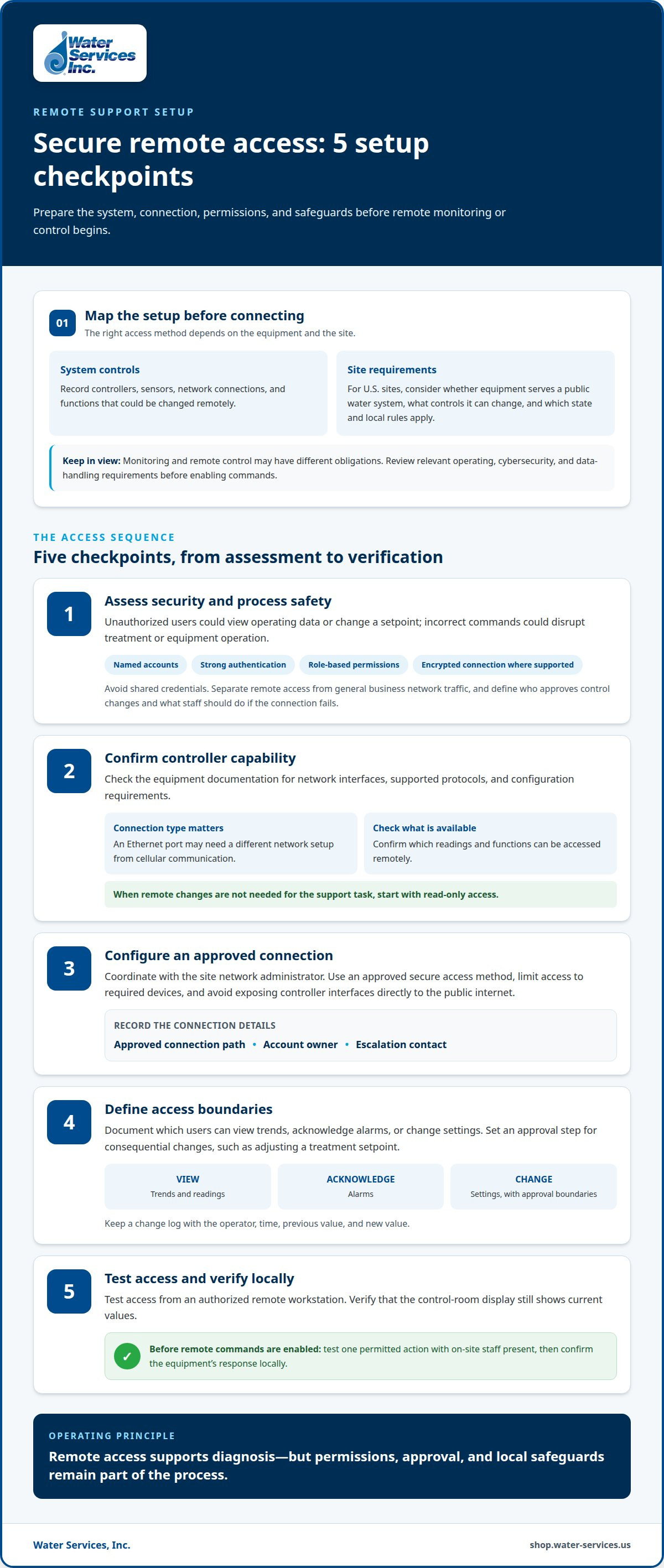
- Map the system before choosing a connection method. Record each controller, sensor, network connection, and function that could be changed remotely. For a U.S. site, assess requirements based on whether the equipment serves a public water system, which controls it can change, and which state and local rules apply. Monitoring and remote control may have different obligations, so document the system’s role and review relevant operating, cybersecurity, and data-handling requirements before enabling commands.
- Assess cybersecurity and process-safety risks before enabling access. Unauthorized users could view operating data or change a setpoint, while incorrect commands could disrupt treatment or equipment operation. Use named accounts, strong authentication, role-based permissions, and encrypted connections where supported. Avoid shared credentials. Separate remote access from general business network traffic, and define who can approve control changes and how staff should respond if the connection fails.
- Confirm that the controller supports remote communication. Check its available network interfaces, supported protocols, and configuration requirements in the equipment documentation. A controller with an Ethernet port may need a different network setup from one using cellular communication. Confirm which readings and functions are available remotely. Start with read-only access when remote changes are unnecessary for the support task.
- Coordinate with the site’s network administrator to configure the connection. Use an approved secure access method, limit access to the required devices, and avoid exposing controller interfaces directly to the public internet. Record the approved connection path, account owner, and escalation contact. Test access from an authorized remote workstation, then verify that the control-room display still shows current values.
- Set operating boundaries before enabling remote commands. Document which users may view trends, acknowledge alarms, or change settings. Define an approval step for consequential changes, such as adjusting a treatment setpoint. Keep a change log listing the operator, time, previous value, and new value. Test one permitted action with on-site staff present, then confirm the equipment’s response locally.
Offering remote help
- Begin each support case with a concise intake record. Capture the site, system type, controller model, current operating mode, and when the problem started. Ask the on-site operator to describe recent changes, alarms, and visible symptoms. For example, “low flow after filter replacement” gives more useful context than “system not working.” Use the record to define the immediate question and identify available readings.
- Collect evidence before recommending adjustments. Request current readings, alarm text, trend screenshots, and relevant maintenance notes. Compare those details with the normal operating conditions documented for that installation. Include timestamps with readings, since values recorded at different operating stages may not be comparable. If a measurement seems inconsistent, ask the operator to read it again at the equipment display.
- To find local water system remote assistance and technical support, search by system type and location, then identify the equipment manufacturer’s service network or industrial water system specialists in the area. Prioritize support familiar with the installed controller, treatment process, and operating environment. Share the system model and issue summary when arranging help so the remote session starts with relevant context.
- Guide the operator through one diagnostic action at a time. Specify the component to observe, the reading to report, and the condition that should stop the test. For instance, compare pump status with the displayed flow reading without asking staff to bypass safeguards. Pause after each observation, record the result, and use it to choose the next safe diagnostic step.
- Keep diagnosis separate from control changes. Explain what a proposed adjustment is intended to test, record the existing setting, and follow the site’s approval process before making any authorized change. Have the operator confirm the displayed value and resulting system behavior. A structured remote assistance and technical support workflow ends with a case note covering symptoms, evidence, actions, outcomes, and any unresolved on-site task.
Which water systems can be monitored and supported remotely?
- Start with systems that have connected controls and accessible operating data. A treatment controller may report alarms, operating mode, and sensor readings to an authorized remote user. Check the installed instrumentation and controller documentation. If a system has no communication interface or digital readings, remote support can still use operator-reported observations, but live monitoring will not be available.
- Assess pump systems by identifying which operating values the control panel makes available. A remote technician may review pump status, pressure readings, alarm history, or run commands if those signals are connected. Compare reported values with the site’s process records. Remote visibility can help narrow down an issue, but it cannot confirm mechanical damage without an inspection.
- For reverse osmosis and filtration processes, map the available sensors and control points. These may include feed and product readings, pressure indicators, flow measurements, and filter status signals, if installed and connected. Use the system diagram to link each displayed value to its equipment stage. This helps distinguish an instrumentation issue from a process change that needs local assessment.
- Review disinfection equipment, such as ultraviolet treatment systems, through its controller interface. Available status indicators and alarms can support remote interpretation if the equipment transmits them. Ask the operator to compare the control display with local indicators. Remote data can guide diagnosis, but physical inspection is still necessary for components that cannot be observed or tested through connected controls.
- Classify each system by what remote users can actually do: view readings, review alarms, guide an operator, or change approved settings. A compact packaged plant may expose several stages through one control interface, while a manually operated installation may provide only local readings. Document these limits for each process, then match support methods to the system’s sensors, controller, and on-site operating procedures.
What steps are involved in troubleshooting a water system remotely?
- Define the fault before changing settings. Record the affected process stage, first symptom, and operating mode. Compare the reported issue with the alarm sequence. For example, a flow alarm before a pressure alarm may help locate where the problem started. Keep observations separate from assumptions throughout the diagnosis.
- Build a timeline from controller history and operator notes. Align alarm timestamps with maintenance, shutdowns, and process changes. A reading recorded before a restart may not explain a fault that appeared afterward. Mark when the system entered each operating state, then focus on values captured under comparable conditions.
- Check whether each measurement makes sense for its location. Compare a sensor reading with an independent local display or operator observation, if available. If a pressure value conflicts with the gauge, investigate the instrument signal before attributing the fault to the process. Do not treat one unexplained reading as proof of equipment failure.
- Trace the process in flow order. Review feed conditions, treatment stages, and downstream readings to find where values first diverge. In a filtration train, compare readings before and after the affected stage. A change that appears downstream but not upstream helps narrow the investigation to that section.
- Test one hypothesis at a time with an approved diagnostic action. State the expected observation before the operator performs the test. Avoid simultaneous adjustments, which can obscure cause and effect. If a test requires opening equipment, handling chemicals, or bypassing a safeguard, stop remote guidance and follow site procedures.
- After an authorized adjustment, compare the same indicators under the same operating mode. Check whether the original symptom changed and whether another alarm appeared. If readings remain inconsistent, restore the documented setting when appropriate and escalate the unresolved inspection or maintenance task for on-site attention.
- Close the case with a concise technical record. Include the fault timeline, readings reviewed, tests performed, setting changes, and observed results. Note the remaining action and responsible site role. This record helps the next technician distinguish a recurring process fault from a new symptom or an earlier diagnostic assumption.
Water Services: Goulds Water Technology Pumps
Water Services, Inc. offers Goulds Water Technology Pumps for industrial water system applications. If troubleshooting points to a pump equipment need, consider the system’s process requirements and the pump’s role in the installation. A pump is one part of the wider system, so treatment and filtration needs may also matter.
Water Services, Inc. also offers Viqua UV Water Purification Systems, Hydranautics RO Membranes, and Water Treatment Antiscalants and Chemicals. These product categories serve different treatment needs. Match the identified equipment need to the process stage and operating conditions before selecting a category.
Contact Water Services, Inc. to discuss equipment needs identified during your system review.
Make Your Next Support Decision With a Clear Record
Use the findings from a remote review to plan the next practical step for your system. A concise record of symptoms, readings, and troubleshooting actions helps clarify whether the priority is further diagnosis, equipment evaluation, or a treatment component. Keep the record with the system’s operating documentation so site staff can refer to it during future maintenance and support discussions.
For equipment needs identified during the review, Water Services, Inc. offers Goulds Water Technology Pumps, Viqua UV Water Purification Systems, and FilmTec Reverse Osmosis Membranes. These categories address different parts of a water system, so match the equipment need to the process stage and operating requirements. A focused record makes the discussion more useful.
For remote assistance and technical support for water systems, organize the issue details and relevant equipment information before taking your next step. Contact Water Services, Inc. for support about your water equipment needs, and move forward with a clear basis for the conversation.
Frequently Asked Questions
What remote assistance services are available for water systems?
Remote assistance can include reviewing controller records, interpreting alarms, and guiding an on-site operator through observations. Remote assistance and technical support for water systems can help distinguish a sensor fault from a process change by using displayed readings and maintenance records. The support available depends on accessible system data and what site staff can safely observe. Faults that require hands-on assessment still need physical inspection.
How does remote technical support for water systems work?
Remote technical support uses system information and communication with site staff to narrow down a fault and identify next steps. Effective remote assistance and technical support for water systems connects the operator’s observations with equipment context. For example, the operator can share an alarm, describe a recent process change, and report local indicators. A technician can then recommend a diagnostic action or identify work that needs on-site assessment.
What equipment and connectivity are needed for remote water system monitoring?
Remote monitoring requires accessible digital data, a compatible controller or communication interface, and an approved network connection. Sensors must measure relevant process values, and the controller must make those readings available to authorized users. For example, a site may need a network gateway between its controller and remote workstation. The required configuration depends on the installed equipment and site network.
0 comentarios