

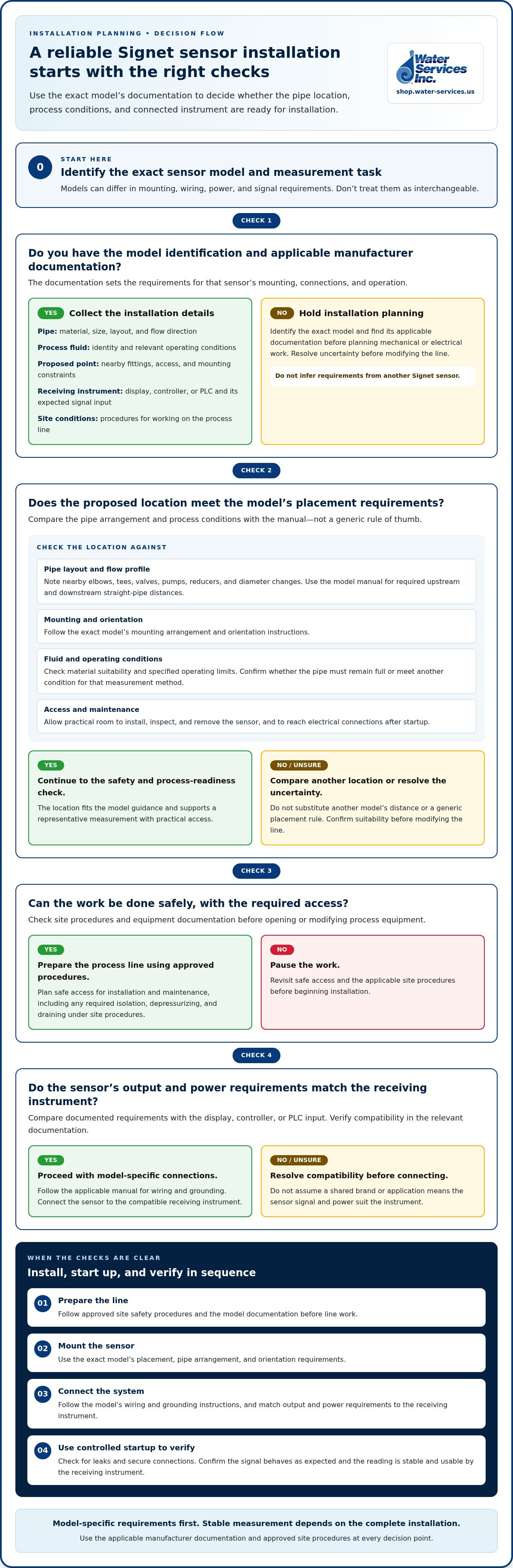
A sensor can be wired correctly and still give an unreliable reading. Installation also depends on the sensor model, pipe conditions, mounting position, and receiving instrument. If you’re researching how to install a signet flow sensor, identify the exact model first and use its manufacturer instructions to plan the work.
A clear installation sequence helps protect measurement quality and process continuity. The location and mounting arrangement can affect flow disturbance, air or sediment interference, and leak risk. The sensor’s output and power requirements must also match the connected controller or instrument.
This guide walks through planning, preparing the process line, mounting and connecting the sensor, and checking the finished setup. It explains what to verify in the applicable manual, including pipe arrangement, orientation, grounding, wiring, and straight-run requirements. The final step is confirming that the sensor produces a stable reading the receiving instrument can use. Because a Signet flow sensor is part of a wider process-instrumentation system, plan for the connected controls as well as the sensor.
Key Takeaways
- Identify the sensor model and measurement task before choosing a mounting arrangement or planning connections.
- Compare installation locations for pipe configuration, process stability, access, and maintenance needs.
- Use the model-specific workflow for how to install a signet flow sensor, following the applicable manual and approved site safety procedures.
- Match the sensor’s output and power requirements to the receiving instrument before connecting the system.
- During controlled startup, check for leaks and secure connections, then verify that the signal behaves as expected and the reading is stable.
Before Installing a Signet Flow Sensor: Identify the Model and Measurement Task
The goal is a repeatable measurement that suits the process and the control system. Before choosing a mounting point, identify the exact Signet sensor and define how its reading will be used. Different models can have different mounting arrangements, wiring, power, and signal requirements. Treating them as interchangeable can result in unsuitable pipework or a signal the receiving instrument cannot use.
Identify the sensor model before planning installation. Its documentation sets the mounting, connection, and operating requirements for that unit. Use those requirements to assess the pipe location, process conditions, and control-system interface before work begins. Doing so can prevent avoidable changes after installation is underway.
What information should you collect before installation?
Record the model identification and locate the applicable manufacturer documentation before planning mechanical or electrical work. Then gather the process and instrumentation details that affect the installation:
- Pipe: Material, size, layout, and flow direction at the proposed measurement point.
- Process fluid: Fluid identity and operating conditions relevant to the sensor’s suitability.
- Installation point: Available access, nearby fittings, and practical constraints for mounting and maintenance.
- Receiving instrument: The display, controller, or PLC, including the signal input it expects.
- Site conditions: Operating and safety procedures for working on the process line.
This information turns a general installation idea into a defined task. A location may be accessible but still be unsuitable because of its pipe configuration or process conditions. Compare the proposed point with the model documentation and site requirements before proceeding, and resolve any uncertainty before modifying the line.
How do sensor type and measurement purpose affect the plan?
Use the applicable manual to identify the sensor’s measurement principle and required mounting arrangement. General flow measurement principles vary by meter type, so understanding how the selected sensor measures flow helps explain why its installation details matter. Don’t infer pipe, orientation, grounding, or wiring requirements from another sensor, even if both carry the Signet name.
Define how the measurement will be used. A local indication has different integration needs from a signal sent to a controller or PLC for monitoring or process control. For a connected system, compare the sensor’s documented output and power requirements with the receiving instrument’s input requirements. Verify compatibility in the relevant documentation rather than assuming it from a shared brand or application.
Once the model, measurement purpose, pipe details, and receiving instrument are identified, the installation plan can address the actual constraints. This is the first practical step in how to install a signet flow sensor without guessing at model-dependent requirements.
Choose a Signet Flow Sensor Location That Suits the Pipe and Process
A suitable location supports a representative measurement and allows practical inspection. Compare candidate points by pipe layout, operating stability, access, and maintenance needs. A convenient place to mount the sensor is not automatically a good measurement point: nearby equipment or changing process conditions may affect the flow profile. Use the exact model’s documentation for placement requirements instead of applying a general rule to every Signet sensor.
How should you assess the pipe run?
Trace the flow direction through the proposed area. Note nearby elbows, tees, valves, pumps, reducers, and other changes in pipe diameter. These features can disturb flow, but their effect and the acceptable distance depend on the sensor design and piping arrangement. Use the model’s manual to establish required upstream and downstream straight-pipe distances. Don’t substitute a distance from another model or a generic rule of thumb.
Compare the pipe layout with the manual’s mounting and orientation instructions. Check that there is enough room to install, inspect, and remove the sensor without blocking normal plant access. A location that meets measurement requirements but is difficult to reach can make routine checks harder. If a nearby process pump could affect flow at the measurement point, assess the location against the manufacturer’s guidance.
Which process conditions must be considered?
Check the process fluid and operating conditions against the sensor documentation. Confirm that the sensor’s materials and specified operating limits suit the application. Determine whether the pipe must remain full or meet another condition for the selected measurement method. These details depend on the model, so don’t assume a location is suitable based only on where it sits in the line.
Plan safe access for installation and maintenance. Follow site procedures and equipment documentation for isolation, depressurizing, and draining before opening or modifying process equipment. Consider whether the selected point allows this work without obstructing nearby operations. Include access for electrical connections and any inspection required after startup.
Use this checklist to compare possible locations:
- Flow profile: Do nearby fittings or equipment meet the model’s straight-run requirements?
- Mounting: Can you achieve the specified orientation and installation arrangement?
- Process: Do the fluid and operating conditions match the sensor documentation?
- Access: Can technicians inspect and maintain the sensor safely?
If no candidate location appears to meet the manual’s requirements, pause before cutting or modifying the line. Reassess the layout and mounting options against the model-specific instructions. Choosing the location carefully is central to how to install a signet flow sensor while supporting dependable measurement and avoiding preventable process or maintenance problems.
How to Install a Signet Flow Sensor Step by Step
Separate process-line work from electrical connection so each can be checked before startup. Exact instructions vary by sensor model and installation configuration. Follow the applicable manufacturer documentation for model-dependent details and facility procedures for process isolation and site safety. Don’t open or modify process equipment until the required controls are in place.
Prepare the line and mount the sensor
Before installation, review the work area, isolation plan, and sensor manual. Confirm the required pressure condition and safe access under site procedures. Use the following as a planning sequence, not as a substitute for the model-specific instructions.
- Prepare the work area. Apply approved isolation procedures and confirm the line is in the required condition before opening or modifying equipment. Use the site’s specified protective measures.
- Check the mounting arrangement. Compare the pipe connection and available clearance with the manual. Confirm the required orientation, insertion depth, sealing method, and fastening procedure for the exact sensor.
- Install and align the sensor. Fit it according to the documented procedure. Match its marked flow direction to the process flow direction, and confirm the assembly is secure before starting electrical work.
- Inspect the mechanical installation. Check the completed mounting and sealing against the manufacturer’s instructions. Keep the process isolated until the mechanical work is ready for the site-approved startup sequence.
Don’t use a mounting detail from a different Signet sensor as a substitute. Differences in connection design or installation arrangement can change the required procedure.
Connect the sensor to its display or control system
Check the electrical connection separately. A correct mechanical fit does not establish that the sensor’s output can be read by the connected instrument. Confirm terminal assignments and connection details in the documentation for the exact model before wiring.
- Verify the interface. Check the sensor’s documented power requirements, output type, terminals, and cable requirements. Compare them with the display, controller, or PLC input and configuration.
- Make and inspect connections. Wire the sensor according to its manual and applicable site electrical practices. Check the terminations and cable routing, and protect the wiring as specified by the equipment instructions.
- Review the integrated system. Confirm that the receiving instrument is configured for the sensor’s documented signal. In a process system with electrical power controls and pumps, consider how the measurement will be used for monitoring or control. Don’t assume components are compatible without checking their documentation.
Before startup, review the mechanical and electrical checks independently. This makes how to install a signet flow sensor a model-aware process rather than a one-size-fits-all procedure. Record the model, connection details, and configuration needed for commissioning.
Commission and Troubleshoot the Signet Flow Sensor Before Handover
Commissioning checks whether the sensor, process, and receiving instrument work together as intended. Use a controlled startup sequence based on the sensor and instrument documentation and facility operating procedures. A signal appearing on a display does not by itself confirm that the reading is correct. Check the physical installation, signal behavior, and measurement stability before handover.
What should you verify during commissioning?
Bring the process and connected equipment into operation using the approved startup procedure. Observe the installation as the system stabilizes, then compare the sensor’s output with the receiving instrument’s expected input and configuration. Follow any model-specific startup or setup instructions. Don’t apply a calibration interval, tolerance, or acceptance value from another sensor. Use the applicable documentation and site procedures.
Work through these checks in order:
- Inspect the process connection. Look for visible leakage and confirm the sensor remains securely mounted.
- Check the electrical connections. Confirm that connections are secure and match the sensor and instrument instructions.
- Confirm the signal. Verify that the receiving instrument recognizes the expected input and that its display or configured response is appropriate.
- Observe the reading. Check for a stable value under the operating conditions being tested. Where site procedures allow, compare it with an appropriate independent reference.
- Document the result. Record the installed model, setup, observed readings, and any configuration changes for handover.
A reference comparison is useful only when the reference method suits the process and is used according to site procedures. Record the conditions during the comparison so later checks can be interpreted consistently.
How can you investigate an unstable or missing reading?
Start with simple checks and change one factor at a time. A missing signal and a fluctuating reading can have different causes, so first note what the instrument displays and whether the process is operating as expected. Avoid changing settings or removing the sensor until you have narrowed down the cause.
- For an unstable value, compare the flow direction, sensor position, and process conditions with the model manual. Consider whether actual process variation could explain the reading.
- For a missing or unexpected signal, compare the wiring, terminals, power requirements, output type, and receiving-instrument configuration with both devices’ documentation.
- If checks point to the installation, follow facility procedures before disturbing the process connection or removing the sensor.
Log each check and its result. A clear troubleshooting record helps prevent repeated adjustments that obscure the original issue. Use the same model-specific approach for commissioning and diagnosis as you do for how to install a signet flow sensor.
For systems where measurement and control equipment work together, explore electrical power controls as part of your instrumentation planning.
Plan Your Signet Flow Sensor Installation Around the Complete System
A flow sensor is one part of a process measurement chain. Its value depends on suitable installation, a signal the receiving instrument can interpret, and records that help the next technician understand the setup. Use handover to connect the model-specific installation with the wider process, including pumps, treatment equipment, and control-system visibility.
What belongs in the installation handover?
Keep a concise record with the equipment so future inspection or troubleshooting can start with installation facts rather than guesswork. Include the applicable model manual and site-specific operating notes. A practical handover checklist includes:
- Sensor identification: Record the exact model and any relevant identification details.
- Installation location: Note where the sensor is mounted and relevant pipe or flow-direction details.
- Mechanical and electrical setup: Document the mounting arrangement, wiring, and connected display, controller, or PLC.
- Configuration: Record the receiving-instrument setup and any changes made during commissioning.
- Observed operation: Capture commissioning observations, including signal behavior and reading stability under the conditions tested.
- Open items: Document deviations or unresolved issues for review under facility maintenance procedures.
Keep the records with the equipment documentation. If a reading changes later, technicians can compare the current setup and process conditions with the original handover instead of guessing whether the sensor or controls were configured differently.
How does the sensor fit into a water-treatment system?
Flow data can help operators monitor a process line. Viewed alongside pump operation and other process information, it gives the control system a measurement to display or use according to its configured purpose. The sensor alone does not guarantee a particular control outcome. Its role depends on the selected output, receiving instrument, and design of the complete process.
For example, a flow measurement can provide visibility into a treatment stage. Operators can interpret it alongside equipment status and other process readings. System-level planning should also account for the treatment process and filtration equipment being monitored, rather than assuming one sensor configuration suits every application.
Make sure the handover identifies where the measurement is displayed or used and which equipment it relates to. This helps technicians interpret readings in context and maintain continuity across instrumentation, pumps, and controls.
Use this sequence as a final review: match the sensor to the measurement task, choose a location that meets documented requirements, follow model-specific mounting and wiring instructions, commission under controlled conditions, and retain the operating record. That is the practical framework for how to install a signet flow sensor as part of an industrial process system.
Browse Signet flow sensors and related electrical power controls to plan instrumentation alongside the equipment that supports your process.
Make the Next Installation a System-Level Decision
Use your next planning review to connect the flow measurement with the process decision it needs to support. A clear purpose for the reading helps align sensor selection, receiving-instrument setup, and future maintenance. Keep the model documentation and handover record accessible so later adjustments reflect the installed configuration.
When evaluating equipment for an industrial process, consider how instrumentation fits alongside the pumps and controls already in the system. Water Services, Inc. supplies industrial water-treatment and pumping equipment, including Signet flow sensors. Browse the available sensors and related equipment as part of your system planning.
Browse Signet flow sensors and industrial instrumentation, then use the model documentation to guide how to install a signet flow sensor for your process. Careful preparation gives you a clear installation plan and a measurement setup designed for its intended purpose.
Frequently Asked Questions
How do you install a Signet flow sensor?
To understand how to install a Signet flow sensor, start with the exact model’s manual and identify the instrument it will feed. Follow the approved site procedure to make the process safe, then complete the model-specific mechanical installation and electrical connection as separate tasks. Before normal operation, confirm that the controller is configured for the sensor’s signal and that the installation matches the documentation. Don’t use another model’s instructions as a substitute.
Where should a Signet flow sensor be installed in a pipe?
Choose a position that meets the sensor’s documented mounting and flow conditions while remaining accessible for inspection. For example, a section near a valve may be easy to reach but could experience changing flow as the valve operates. Compare possible locations against nearby fittings and process behavior, then use the exact model’s instructions to assess orientation and placement. A suitable position depends on both the sensor design and the pipe arrangement.
Does a Signet flow sensor need a straight pipe run?
It may require straight pipe before or after the sensor, but the distances depend on the model and upstream piping arrangement. Elbows, tees, valves, pumps, and diameter changes can affect the flow profile, so don’t apply one universal distance to every installation. Check the sensor manual for required run lengths and guidance for nearby disturbances. If the pipe layout differs from the documented arrangement, resolve that before installation.
How do you wire a Signet flow sensor to a controller?
Use the terminal diagram and wiring instructions for the exact sensor and controller. Identify the sensor’s output type and power needs, then check that the controller accepts and is configured for that signal. Follow the documented terminal assignments, cable requirements, and grounding instructions. Wire colors or terminal layouts from another device aren’t reliable substitutes. After connecting, inspect the terminations and confirm the controller recognizes the intended input before relying on the displayed value.
Why is my Signet flow sensor reading zero or fluctuating?
A zero reading can reflect absent flow, an installation condition the sensor cannot measure, a power issue, or a signal mismatch. Fluctuations may reflect changing process flow, sensor location, wiring, or instrument setup. Check the operating state and compare the sensor, pipe arrangement, and controller configuration with their documentation. Change one item at a time and record the result. Don’t remove the sensor or alter settings until site procedures make the work safe.
Do Signet flow sensors need calibration after installation?
Whether calibration or a verification check is required depends on the sensor model, application, and site quality procedures. Follow the manufacturer’s instructions for initial setup and any specified calibration method. Don’t assume a universal interval or apply a tolerance from another instrument. If a comparison is required, use an appropriate reference method under defined process conditions and document the result. Keep the records with the equipment so later checks can be compared with the installed baseline.
Can a Signet flow sensor connect to a PLC?
A Signet flow sensor can connect to a PLC when its output, power requirements, and wiring arrangement match an available PLC input and the system configuration supports that signal. Verify these points in the sensor and PLC documentation before connecting them. The PLC may also need suitable input scaling or configuration for the measurement. Don’t infer compatibility from the sensor brand alone. Confirm the specific interface and test the signal before using it for process decisions.
0 comentarios